CINRAY CLOUD PLATFORM

Your CBCT scans. Any browser. Full clinical detail.

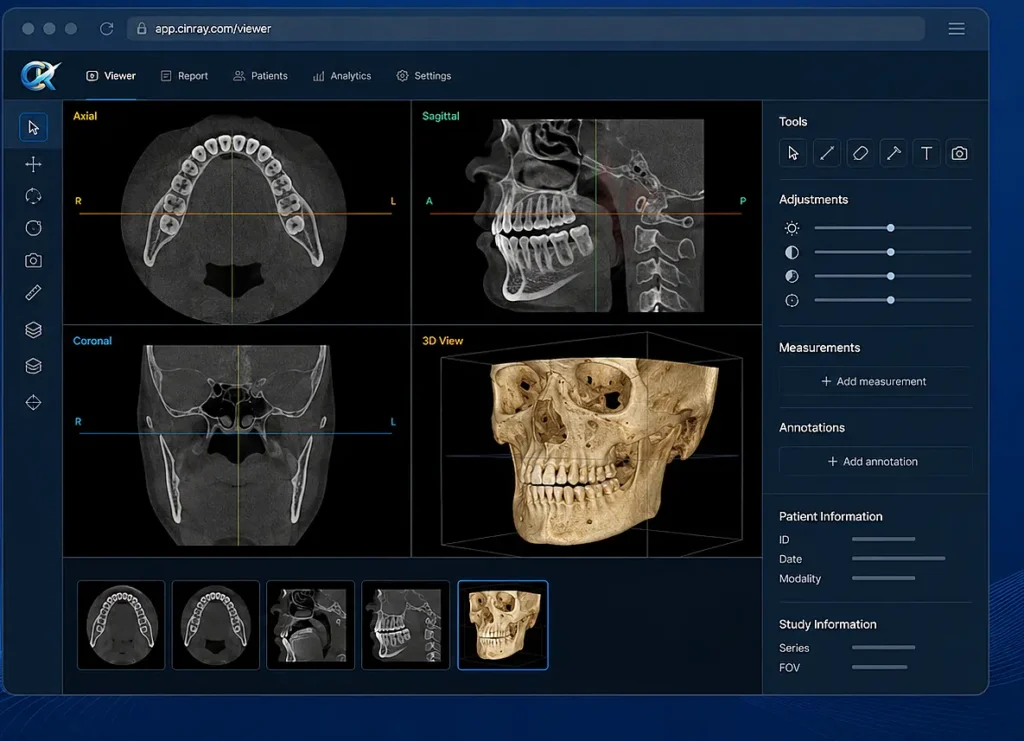
CINray brings CBCT viewing, arch and cross-sectional measurement, and structured reporting into one cloud platform — so your scans, your radiologists and your referring doctors finally work from the same place.

cinray cbct software hero image

Works with any DICOM scanner  ·  No installation  ·  Per-study pricing

Reads DICOM from any scanner

CarestreamPlanmecaVatechSironaMoritaNewTomInstrumentariumKaVo

THE PROBLEM

Scans stuck on one machine. Reports stuck in a queue.

Most CBCT software runs on the single workstation attached to your scanner. The radiologist has to be at that machine. Referring doctors wait for a file to arrive by email, or a pen drive to change hands. Nobody can see where a case actually stands.

FEATURES

Built for how dental imaging actually works

Every reconstruction and measurement tool a radiologist needs, running in a browser tab.


01 — Reconstruction

Arch and cross-sectional views

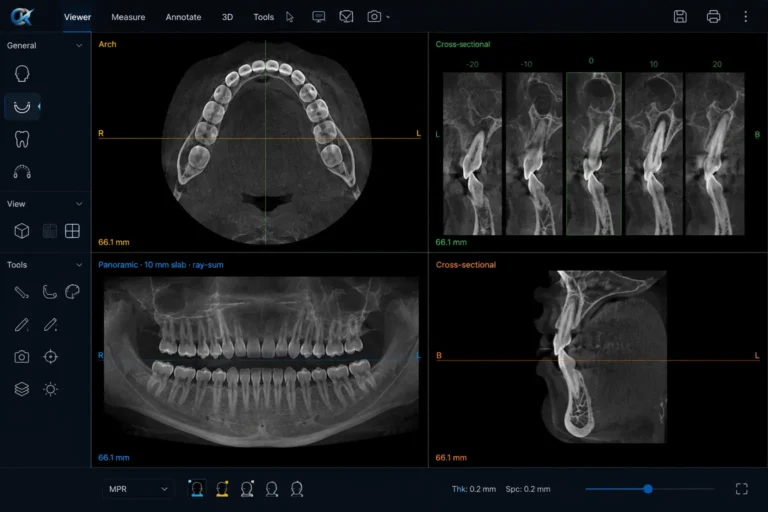
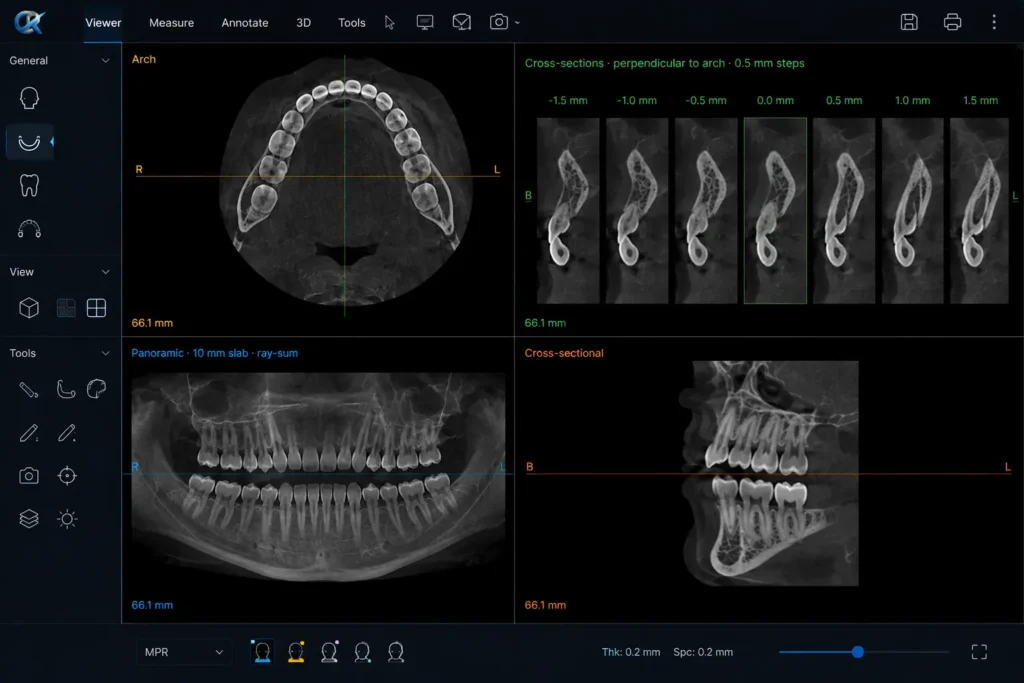
Plot the dental arch and generate a panoramic reconstruction. Cross-sectional slices are projected perpendicular to the arch at 0.5 mm stations, giving precise views of bone at any site along the curve.

arch and cross sectional view
Panoramic · 10 mm slab · ray-sum

cross section to arch view
Cross-sections · perpendicular to arch · 0.5 mm steps

02 — Measurement

Millimetre measurement and annotation

Linear distance in millimetres and angular measurement in degrees, calculated from the scan’s own pixel spacing — not an estimated screen scale. Text labels and arrow markers save to the study and reload exactly as left.

03 — Reporting

From measurement to signed report

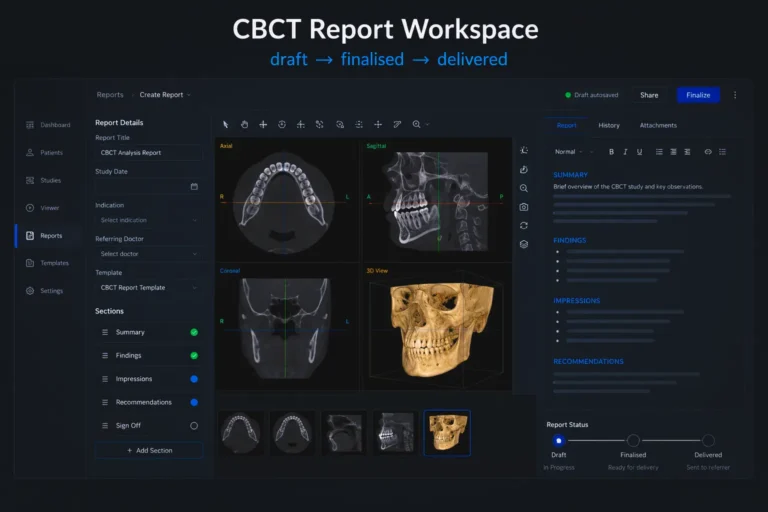
Pull the views you measured straight into the report. Findings, images and clinic letterhead compile into a locked PDF. Send it by email or WhatsApp, or share a secure link — the referring doctor has it the same day.

cinray cbct report workflow
Report workspace · draft → finalised → delivered

HOW IT WORKS

Upload, read, deliver

STEP 01

Upload the study

Drag a DICOM folder into the browser. It lands in encrypted cloud storage and the assigned radiologist is notified automatically.

STEP 02

Read and measure

Open it from any machine. Plot the arch, scroll the cross-sections, take measurements, and drop findings straight into the draft report.

STEP 03

Deliver the report

Finalise to a locked PDF on your clinic letterhead. Send by email or WhatsApp. Every access is logged.

WHO IT’S FOR

Made for teams reading real volume

Imaging centres

Route studies to the right radiologist and deliver to referring clinics without chasing files.

  • Assign and track turnaround
  • Branded report delivery
  • Multi-user access

Clinic chains

Every branch uploads to the same platform. Reporting stays consistent across locations.

  • Central administration
  •  Consistent report templates
  • Per-branch visibility

Hospitals with dental practice

Bring CBCT reporting into a controlled, access-managed system with a complete audit trail.

  • Role-based permissions
  • Immutable audit log
  • Encrypted storage

COMPARISON

Why move off desktop software

Desktop CBCT software CINray
Setup Install and configure per machine Open a browser tab
Access One workstation Any machine, anywhere
Cost Large one-time licence or fixed monthly fee Per study read
Sharing Pen drive, CD or emailed ZIP Email, WhatsApp or secure link
Team access Shared login on one PC Roles for admin, radiologist, doctor, front desk
Audit trail None Every access and download logged

PRICING

Pay for the studies you read. Nothing else.

No licence to amortise, no seats to buy in advance, no fee for a machine sitting idle.

Early access

Per-study pricing

Preferential rates locked in as we grow, and direct input into the roadmap.

  • Cloud CBCT viewer, full multi-planar navigation
  • Arch and cross-sectional reconstruction
  • Linear and angular measurement, annotation
  • Structured reporting and locked PDF generation
  • Email, WhatsApp and secure-link delivery
  • Role-based access for your whole team
  • Encrypted cloud storage with full audit trail

Not ready to subscribe?

See it running on your own studies first, or talk through what a multi-branch rollout looks like.

  • Walkthrough on sample or your own scans
  • Rollout planning for multiple branches
  • Answers on storage, roles and delivery

FAQs

Questions, answered

Do I need to install anything?

No. CINray runs in a standard web browser on desktop or laptop. Your radiologists don’t need software on a specific machine.

What scanners does it work with?

CINray reads standard DICOM files, which all CBCT scanners produce. If your machine exports DICOM, your studies will open.

Where are our scans stored?

In encrypted cloud storage, with access restricted by role. Every access and download is logged.

How does per-study pricing work?

You’re charged per study read on the platform. No licence fee, no monthly minimum. Details are shared at signup.

Can referring doctors access reports?

Yes. Doctors get access to the cases assigned to them, and finalised reports can be sent by email, WhatsApp or secure link.

Can we try it before committing?

Yes — get in touch and we’ll arrange a walkthrough using sample studies or your own.

cinray logo

Cloud CBCT viewing, measurement and reporting for dental imaging teams in India.


© 2026 CINray. All rights reserved. Made for dental imaging teams
Scroll to Top